
your AI snacks for the week 🍿
noticias de la IA, hechas sin IA - AI news, made without AI

not a spanish reader? don’t worry, just scroll below for the english version
¿Qué onda con la IA esta semana?
// RIP a la privacidad - estos lentes con IA te pueden reconocer 🕵🏻♀️
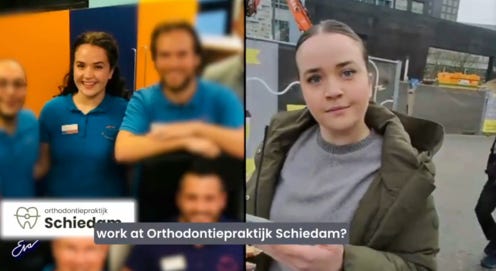
Hace un año, un periodista usó unos lentes con IA que, al hablar unos segundos con distintas personas en la calle, las identificaban y buscaban en internet toda su información pública disponible: su perfil de Facebook, LinkedIn, Instagram, todo. El objetivo del experimento era mostrar lo invasivo que el reconocimiento facial se está volviendo.
Si bien esta noticia es de Noviembre del 2024, el video volvió a viralizarse esta semana, recordándonos que desde entonces, no se tomaron cartas en el asunto. Por eso, creo que es un llamado de atención para que, como usuarios, tomemos algunas medidas de seguridad. Por ejemplo, minimizar nuestra huella digital, tener cuidado con lo que compartimos online, desconfiar de las apps que nos piden reconocimiento facial sin justificación y ajustar la configuración de privacidad para limitar quién puede ver nuestra información.
// ChatGPT código rojo 🚨
La carrera de la IA no para un segundo, y si pestañeás, quedás atrás. El -hasta hace poco tiempo- indiscutible líder y creador de ChatGPT alertó un código rojo debido a los nuevos lanzamientos de sus competidores que le sacaron el primer lugar. Desde el lanzamiento de Gemini 3 y Opus 4.5, el tráfico de ChatGPT cayó significativamente.
Este código rojo implica para OpenAI una repriorización de productos, enfocando todos los esfuerzo de la empresa en mejorar ChatGPT. Se comenta que la empresa tomó una serie de medidas internas, como reuniones diarias de emergencia con los empleados.
Creo que lo bueno de toda esta competencia es que nosotros, como usuarios, vamos a tener versiones cada vez mejores de los modelos de IA, que nos van a ayudar a ser mucho más productivos y eficientes.
// The NY Times vs. Perplexity y ChatGPT 🥊
La semana pasada, The New York Times presentó una demanda contra Perplexity, con la causa de que la startup de IA está copiando y distribuyendo miles de sus artículos sin permiso y sin darle el crédito. Meses atrás, el mismo diario había iniciado una demanda contra ChatGPT por razones similares.
Otra novedad de esta semana es que OpenAI tiene que entregar 20 millones de conversaciones de ChatGPT como evidencia para el juicio. La empresa se resistió porque entregar esos registros “revelaría información confidencial del usuario”. El juez rechazó las objeciones, exigiendo que entreguen las pruebas, aunque aseguraron que los chats serán anonimizados.
// Siguen los estrenos en Google 💥
Después del lanzamiento de Gemini 3, la estrella del momento. Google sigue con sus estrenos. Te cuento los de la última semana:
Gemini Deep Think es un nuevo modo de razonamiento que se puede activar dentro de Gemini. La clave es que al activar este modo, el modelo evalúa múltiples hipótesis, ideas, o caminos simultáneamente, como si fuesen varios modelos de IA trabajando a la vez (parecido a cómo lo hacemos los humanos).
Para darte un poquito más de contexto: cuando un modelo de IA es entrenado, se lo evalúa con distintas métricas que indican su rendimiento. En este caso, la métrica que usaron se conoce como Humanity (porque justamente evalúa la capacidad de un modelo de IA de parecerse al pensamiento humano). En esta prueba, Deep Think supera a los competidores y modelos anteriores de Google.
Google Workspace Studio es una nueva herramienta de Google enfocada en la creación de agentes de IA para automatizar distintas tareas. Vale aclarar que para tener acceso, es necesario 1) tener una URL registrada, y 2) pagar una suscripción mensual.
Quizás hayas escuchado hablar de los agentes de IA pero nunca supiste cómo crear uno. Quizás ni siquiera escuchaste mencionar el término, y en ese caso te recomiendo ver este video.
Algunos casos de uso de agentes de IA que te podrían ser útiles son: automatizar mails de respuesta a clientes, generar publicaciones para redes sociales o armar reportes recurrentes, entre otros. Mirá cómo Google Workspace Studio funciona acá.
Truquitos de la semana
// Ahora NotebookLM lee tus apuntes a mano ✍🏼
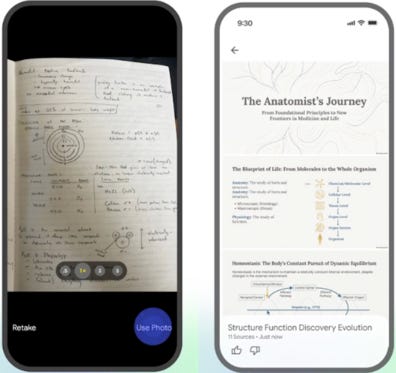
Esta semana, la nueva actualización de NotebookLM es que ahora podés subir fotos de tus apuntes a mano, o de un pizarrón con anotaciones, y crear presentaciones o infografías en segundos. Mirá cómo funciona acá.
P.S.: NotebookLM para mi es una de las joyas más valiosas actualmente. Si todavía no le diste una chance, por favor hacelo.
// Lográ que tus imágenes sean pro 📸
Google AI Studio compartió una guía de tips para elevar el uso de Nano Banana. Estas son las reglas de oro para promptear mejor en generación de imágenes (y en general):
Editá el resultado, no lo repitas (por ejemplo: “está genial, pero cambiá la iluminación a atardecer y hacé que el texto sea azul neón”.
Utilizá lenguaje natural y oraciones completas (escribí como si le estuvieses dando instrucciones a una persona de verdad).
Sé bien específico y descriptivo (por ejemplo: en vez de decir, “una mujer”, decí “una mujer mayor y sofisticada que viste un traje vintage rojo estilo Chanel).
Da todo el contexto posible.
Prompts de la semana 🎤
// Duplicá el estilo de cualquier imágen que quieras
Abrí Gemini y seleccioná el modo Nano Banana.
Cargá cualquier imágen que quieras copiar.
Copiá y pegá este prompt:
“Extraé el estilo visual y devolvelo como datos estructurados en un JSON válido que incluya colores, tipografía, composición y efectos”Guardá el archivo generado.
Cargá tu imagen, a la cual le querés modificar el estilo.
Copiá y pegá este prompt:
“Aplicá el estilo visual que figura en el archivo JSON adjunto para recrear ese mismo estilo en la imagen”// Análisis de artículos 🤓
Copiá y pegá este prompt:
“Analizá paso a paso la metodología, los hallazgos clave y las limitaciones de este artículo, usando una lista numerada. Después, redactá un resumen de tres oraciones centrado en cómo pueden aplicarse en la práctica los resultados del estudio”Luego de que la IA genere el resumen, podés hacer un chequeo rápido:
• Exactitud: ¿refleja las ideas centrales del texto?
• Claridad: ¿usa un lenguaje directo y fácil de entender?
• Completitud: ¿incluye todos los puntos esenciales sin excederse?
• Brevedad: ¿es lo suficientemente conciso como para leerse de un vistazo?
english version
What’s up with AI this week?
// RIP privacy 🕵🏻♀️ these AI glasses can recognize you
A year ago, a journalist used AI glasses that, after speaking for a few seconds with different people in the street, identified them and searched the internet for all their available public information: their Facebook, LinkedIn, Instagram profiles, and everything related. The goal of the experiment was to show how invasive facial recognition is becoming.
Even though this story is from November 2024, the video went viral again this week, reminding us that since then, nothing has been done about it. That is why I think it is a wake up call so that we, as users, take some safety measures. For example, minimizing our digital footprint, being careful with what we share online, being wary of apps that ask for facial recognition without justification, and adjusting our privacy settings to limit who can see our information.
// ChatGPT code red 🚨
The AI race does not stop for a second, and if you blink, you fall behind. The -until recently- undisputed leader and creator of ChatGPT has declared a code red due to new launches from its competitors that knocked it out of first place. Since the launch of Gemini 3 and Opus 4.5, ChatGPT’s traffic has dropped significantly.
This code red means a reprioritization of products for OpenAI, focusing all of the company’s efforts on improving ChatGPT. It is being said that the company has taken a series of internal measures, like daily emergency meetings with employees.
I think the good thing about all this competition is that we, as users, are going to get increasingly better versions of AI models that will help us be much more productive and efficient.
// The NY Times vs Perplexity and ChatGPT 🥊
Last week, The New York Times filed a lawsuit against Perplexity, arguing that the AI startup is copying and distributing thousands of its articles without permission and without giving it credit. Months earlier, the same newspaper had filed a lawsuit against ChatGPT for similar reasons.
Other news this week is that OpenAI has to hand over 20 million ChatGPT conversations as evidence for the trial. The company resisted because handing over those records “would reveal confidential user information”. The judge rejected the objections, demanding that they provide the evidence, although they did state that the chats will be anonymized.
// Premieres keep coming at Google 💥
After the launch of Gemini 3 -the star of the moment- Google keeps rolling out premieres. Here are last week’s ones:
Gemini Deep Think is a new reasoning mode that you can turn on inside Gemini. The key new thing is that when you activate this mode, the model evaluates multiple hypotheses, ideas, or paths at the same time, as if several AI models were working in parallel (similar to how we humans do it).
To give you a bit more context, when an AI model is trained, it is evaluated with different metrics that indicate its performance. In this case, one of the metrics they used is known as Humanity (because it evaluates how much an AI model resembles human thinking). In this test, Deep Think beats both competitors and Google’s previous models.
Google Workspace Studio is a new Google tool focused on creating AI agents to automate different tasks. It is worth mentioning that to get access you need to 1) have a registered domain, and 2) pay a monthly subscription.
Maybe you have heard about AI agents but you never knew how to create one. Maybe you have not even heard the term, and in that case I recommend watching this video.
Some AI agent use cases that could be useful for you are automating reply emails to clients, generating social media posts, or building recurring reports, among others. See how Google Workspace Studio works here.
Tricks of the week 🎯
// Now NotebookLM reads your handwritten notes ✍🏼
This week, NotebookLM’s new update is that you can upload photos of your handwritten notes, or of a whiteboard with annotations, and NotebookLM creates presentations or infographics in seconds. See how it works here.
PS: NotebookLM is one of the most valuable hidden gems for me right now. If you have not given it a try yet, please do.
// Make your images look pro 📸
Google AI Studio shared a guide of tips to level up your use of Nano Banana. These are the golden rules for better prompting:
Edit your result, do not repeat it (for example: “this is great, but change the lighting to sunset and make the text neon blue”.
Use natural language and full sentences (write as if you were giving instructions to a real person).
Be very specific and descriptive (for example: instead of saying “a woman”, say “an older and sophisticated woman wearing a vintage red Chanel style suit”).
Provide as much context as you can.
Prompts of the week 🎤
// Double the style of any image you want
Open Gemini and select Nano Banana mode.
Upload any image you have found online and like, or that you want to copy.
Copy and paste this prompt:
“Extract the visual style and return it as structured data in valid JSON that includes colors, typography, composition, and effects”Save the generated file.
Upload the image whose style you want to change.
Copy and paste this prompt:
“Inject the visual style found in the attached JSON file to recreate that same style in the image”// Article analysis 🤓
Copy and paste this prompt:
“Analyze the methodology, key findings, and limitations of this academic paper step by step. Then, write a three-sentence summary focused on how the study’s findings can be applied in practice.” After the AI generates a summary, do a quick check:
- Accuracy: does it capture the text’s central ideas?
- Clarity: is the language direct and easy for the reader to understand?
- Completeness: does it incluse all the essential points without overdoing it?
- Brevity: is it concise enough to be scanned at a glance?